
You do not need to become a security expert to make a better privacy decision. Start with what travels over your connection, who can see it and what still needs protecting on your device.
01 / What happens inside a VPN tunnel?
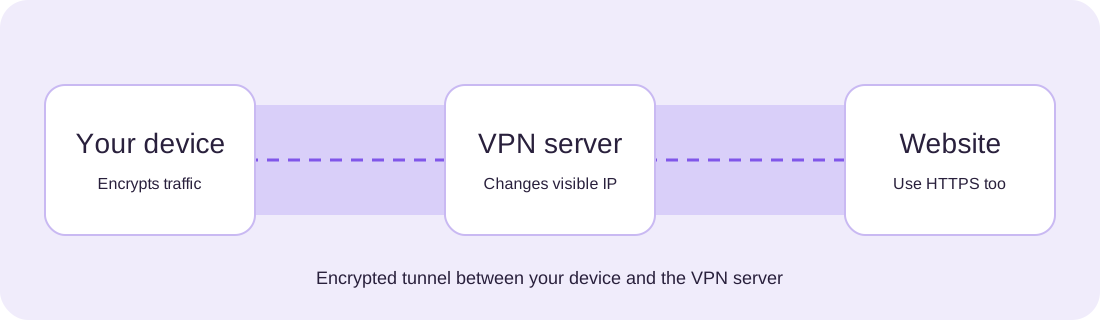
When you connect to a VPN, the app creates an encrypted connection to a server operated by the VPN provider. On a shared Wi-Fi network, this helps prevent other participants from directly inspecting the contents of that tunnel. Websites generally see the server’s IP address instead of your home connection’s address.
That protection has boundaries. Traffic leaves the VPN server to reach its destination. HTTPS remains essential for encrypting content between your browser and the website. A VPN also changes who you trust: the VPN operator becomes part of the connection path.

02 / Privacy is not invisibility
A VPN cannot make a signed-in social account anonymous. Cookies, account details, browser fingerprints and information you willingly share can still connect activity to you. A no-logs policy is a statement to examine, not a reason to stop asking questions. Look for a clearly described audit scope, publication date and the systems that were actually examined.
Nor does a VPN guarantee access to every streaming service or prevent every phishing attack. Availability depends on provider, destination and local restrictions. Be cautious with claims of complete anonymity or universal protection.
“What risk am I trying to reduce?” is a better starting point than “Which app promises the most?”
03 / Configure your VPN for your routine
Check how your VPN behaves on your actual operating system. Desktop apps, mobile apps and browser extensions may cover different traffic. Read the platform-specific guidance for connection status, startup, trusted networks and any traffic exceptions.

Start with the habits that keep helping
Install operating-system and browser updates, use unique passwords stored in a password manager, and enable multi-factor authentication where available. Keep a separate backup of important files and verify that you can restore it. Security software complements these steps; it does not replace them.
Keep one understandable connection setup
Avoid running several VPN configurations at once without understanding their interaction. Remove obsolete profiles through the supported settings and test the connection after switching providers. Keep notes on any split-tunneling rules or network exceptions you choose.
04 / A better subscription checklist
Read the amount charged today, the billing interval, renewal amount and cancellation route. A low monthly equivalent can require a larger upfront payment. Refund eligibility can depend on region, payment method and where you buy. Save your order confirmation and set a reminder before renewal if you do not want another term.
Next, check native app support for your device and the features you need. A browser extension may protect browser traffic only. A full VPN app can offer a different scope. For households, check simultaneous connections and the conditions attached to device coverage.

05 / Watch the connection journey
This original silent animation follows the same three stages as the diagram. Captions are available in the player; a full text alternative follows below.
Read the video transcript
Your device encrypts traffic before sending it to a VPN server. The VPN server forwards the connection to a website, which generally sees the server’s IP. Use HTTPS for the website connection. A VPN does not replace HTTPS, updates or careful account use.
Continue with primary sources
Proton VPN features and transparency · NordVPN feature documentation · Surfshark feature overview